

【工具篇】手把手教你自定义protobuf 标签
1、背景
正常情况下通过 protoc 生成的 pb.go 文件中的标签是官方定义好的,如果需要pb.go 作为参数请求,或者需要将该结构体转为json ,则会有部分“空”值字段会被忽略。从而存在一些问题。
如下图所示
message ListChannelReq {
int64  community_id = 1;
}
通过protoc 生成 pb.go 文件
protoc -I . --go_out=plugins=grpc,paths=source_relative:. ./channel.proto
type ListChannelReq struct {
	state         protoimpl.MessageState
	sizeCache     protoimpl.SizeCache
	unknownFields protoimpl.UnknownFields

	CommunityId int64 `protobuf:"varint,1,opt,name=community_id,json=communityId,proto3" json:"community_id,omitempty"`
}
问题:
1、这里 生成的 字段中 json 标签字段 如果如果值为0 则在转json的时候字段丢失,会转成 {}
2、如果我们想要在该 字段属性上添加其他标签该怎么办?如 form 标签
2、自定义protobuf 标签
2.1 通过修改 protoc-gen-go 源码
git clone https://github.com/golang/protobuf.git
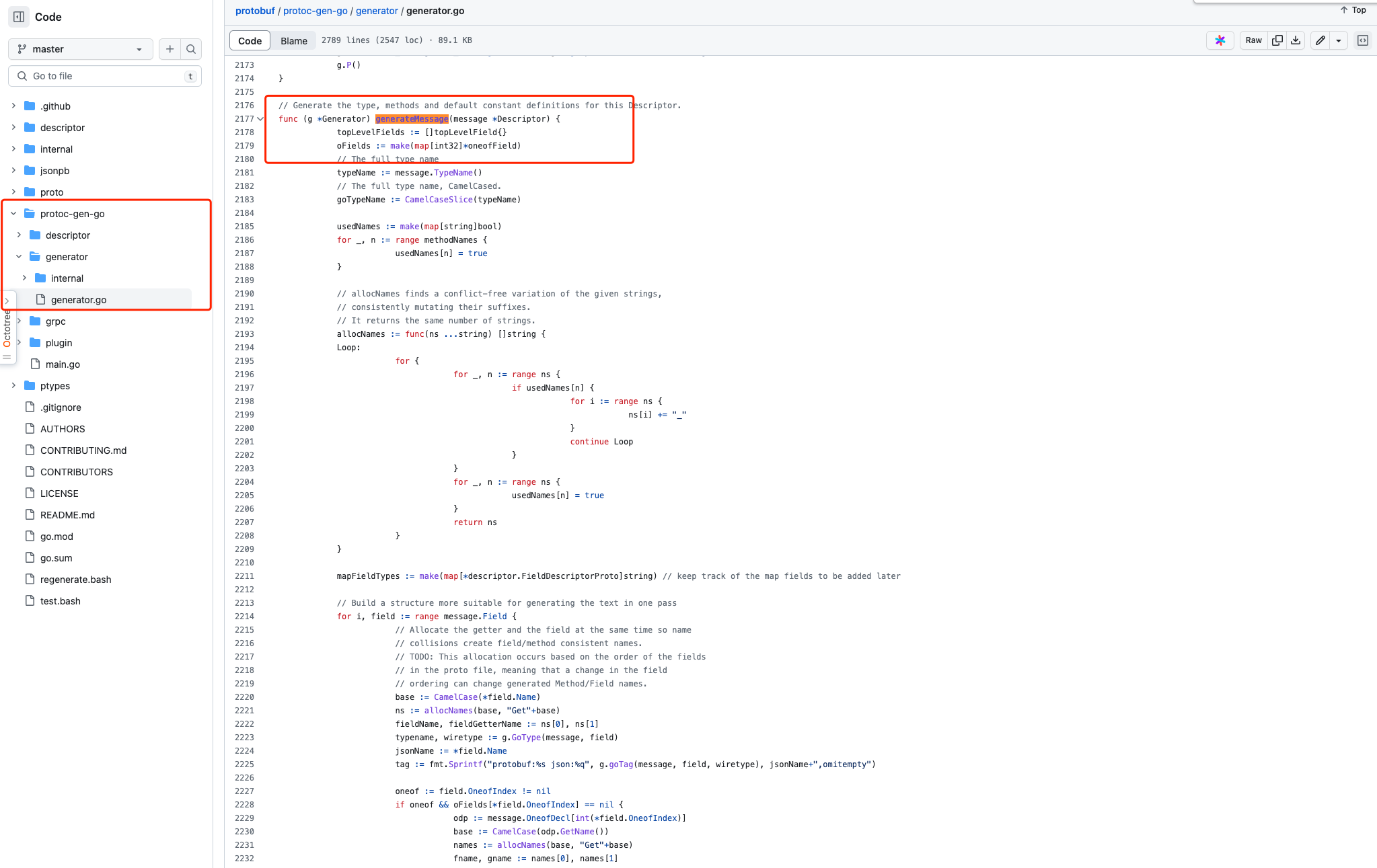
1、找到 generateMessage 方法
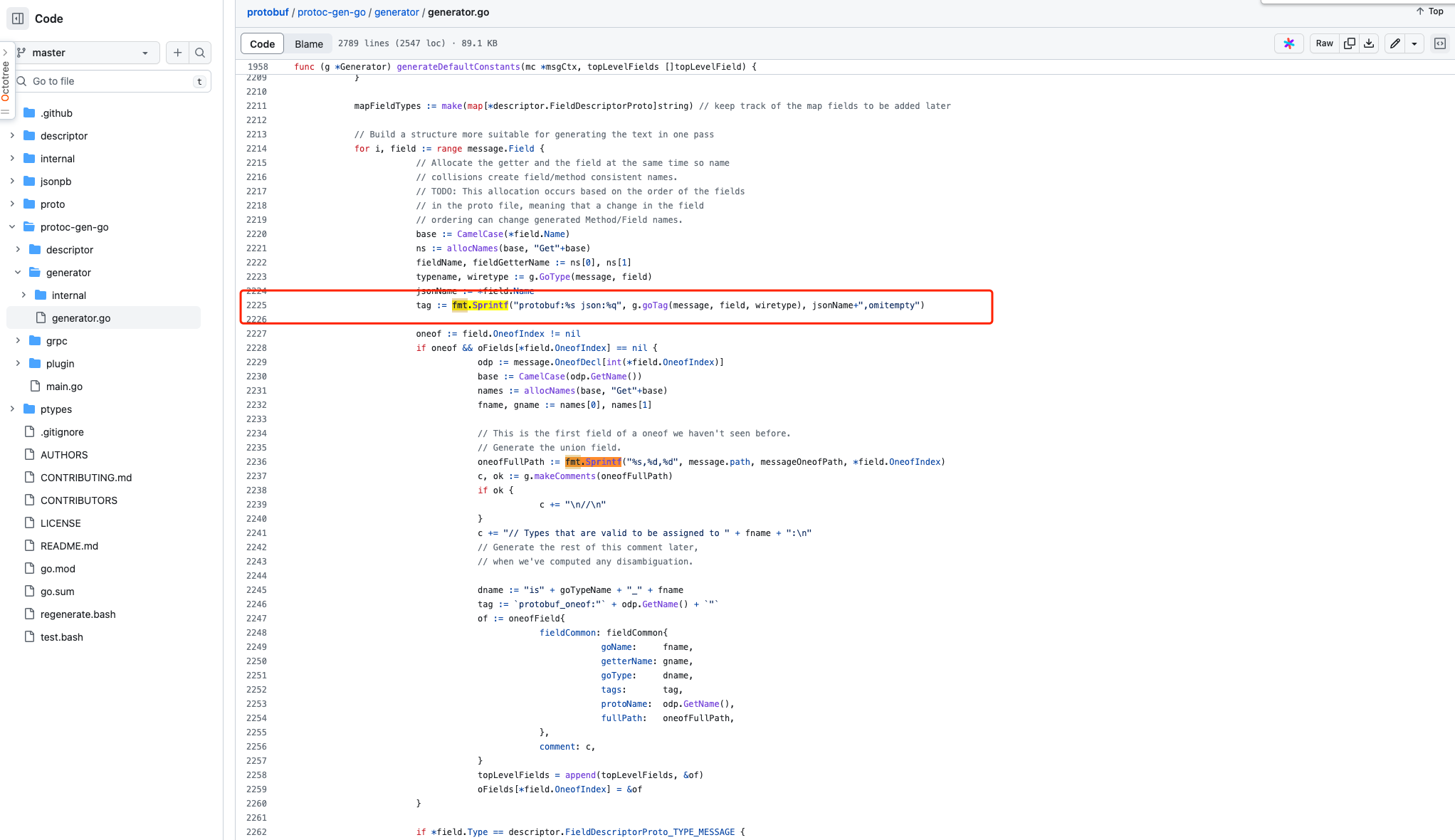
2、在方法内找到 _tag := fmt.Sprintf(“protobuf:%s json:%q”, g.goTag(message, field, wiretype), jsonName+“,omitempty”),并替换成 tag := fmt.Sprintf(“protobuf:%s json:%q xml:%q form:%q”, g.goTag(message, field, wiretype), jsonName, jsonName, jsonName), _对就多了个form标签
3、添加一个方法, 获取到proto文件的注释信息, 在generator.go文件的任意位置即可。
func (g *Generator) GetComments(path string) string {
	if !g.writeOutput {
		return ""
	}
	if loc, ok := g.file.comments[path]; ok {
		text := strings.TrimSuffix(loc.GetLeadingComments(), "\n")
		for _, line := range strings.Split(text, "\n") {
			comments := strings.TrimPrefix(line, " ")
			return comments
		}
	}
	return ""
}
4、在文件内找到**_ g.PrintComments(fmt.Sprintf(“%s,%d,%d”, message.path, messageFieldPath, i)),_**注释掉,并添加如下内容
//g.PrintComments(fmt.Sprintf("%s,%d,%d", message.path, messageFieldPath, i))
path := fmt.Sprintf("%s,%d,%d", message.path, messageFieldPath, i)
g.PrintComments(path)
comments := g.GetComments(path)
if comments != "" && strings.Contains(comments, "binding") {
	comments = strings.Replace(comments, "\r", "", 1)
	cArr := strings.Split(comments, "|")
	if len(cArr) > 1 {
		tag = tag + fmt.Sprintf(" binding:%q", strings.Replace(comments, cArr[0]+"|binding:", "", 1))
	}else{
		tag = tag + fmt.Sprintf(" binding:%q", strings.Replace(comments, "binding:", "", 1))
	}
}
5、文件修改完毕进行编译
SET CGO_ENABLED=0
SET GOOS=linux
SET GOARCH=amd64
go build main.go
6、编译好的文件protoc 安装位置 并重命名为protoc-gen-go,最好是放到/usr/local/bin目录下。
1、 whereis protoc-gen-go
2.2 使用第三方库 protoc-go-inject-tag
1、安装下载库
go install github.com/favadi/protoc-go-inject-tag@latest
$ protoc-go-inject-tag -h
Usage of protoc-go-inject-tag:
  -XXX_skip string
        tags that should be skipped (applies 'tag:"-"') for unknown fields (deprecated since protoc-gen-go v1.4.0)
  -input string
        pattern to match input file(s)
  -verbose
        verbose logging
  -remove_tag_comment
        removes tag comments from the generated file(s)
2、使用 ( 在原有的基础上添加 @gotags )
// gotags: tagname:"tagvalue" ...
message ListChannelReq {
	// @gotags: json:"community_id" form:"community_id"
	int64  community_id = 1;
}
3、像往常一样使用 protoc 命令生成文件
protoc -I . --go_out=plugins=grpc,paths=source_relative:. ./*.proto
type ListChannelReq struct {
	state         protoimpl.MessageState
	sizeCache     protoimpl.SizeCache
	unknownFields protoimpl.UnknownFields

	// @gotags: json:"community_id" form:"community_id"
	CommunityId int64 `protobuf:"varint,1,opt,name=community_id,json=communityId,proto3" json:"community_id,omitempty"`
}
4、然后protoc-go-inject-tag针对生成的文件运行
protoc-go-inject-tag -input="*.pb.go" -remove_tag_comment
使用该-remove_tag_comment标志,您可以删除通常注释到生成的代码的 gotag 注释。这允许使用代码注释生成 openapi 文件的 swag/openapi 生成器等库提供更无缝的支持。
type ListChannelReq struct {
	state         protoimpl.MessageState
	sizeCache     protoimpl.SizeCache
	unknownFields protoimpl.UnknownFields

	CommunityId int64 `protobuf:"varint,1,opt,name=community_id,json=communityId,proto3" json:"community_id" form:"community_id"`
}
3 参考建议
建议使用第二种方案,其侵入性较小,方便快捷
- 感谢你赐予我前进的力量
-
 微信
微信  支付宝
支付宝